
Operations: from the request to the closed ticket.
Everything comes in here. A call from the client, an alarm raised, a planned preventive visit: the request becomes a qualified ticket, assigned, dated, and tracked through to signed proof.
A deadline that accounts for reality.
This is the most important rule in the platform, and the one missing everywhere else: the countdown pauses when you are waiting on somebody else. A supplier part, an access permit, a customer decision, an outage window: time spent waiting is not charged against you.
- Every status declares whether it pauses the contractual clock
- The ticket shows real time remaining, not time elapsed since it opened
- The dashboard counts as overdue only what is actually down to you
- The customer report separates working time from waiting time
Why this rule exists. Without it, a healthy operation shows a majority of tickets “late”, because a third party has not replied. Figures that accuse wrongly end up being ignored, and an operation nobody measures degrades without anyone noticing.
What dispatch does
Qualify
The site, the type of work, the equipment class and the priority. The due date is calculated from the priority and the contractual commitment.
Assign
A team, then a technician. Each person’s workload and the next seven days of deadlines are visible at the moment of choosing.
Track
A list filtered by status, priority, team, type of work or customer. The filter is shared through its address: a link, not a screenshot sent by chat.
Report
Export of the filtered list, activity report by customer and period, work order printable straight from the record.
Everything about the job, in one place.
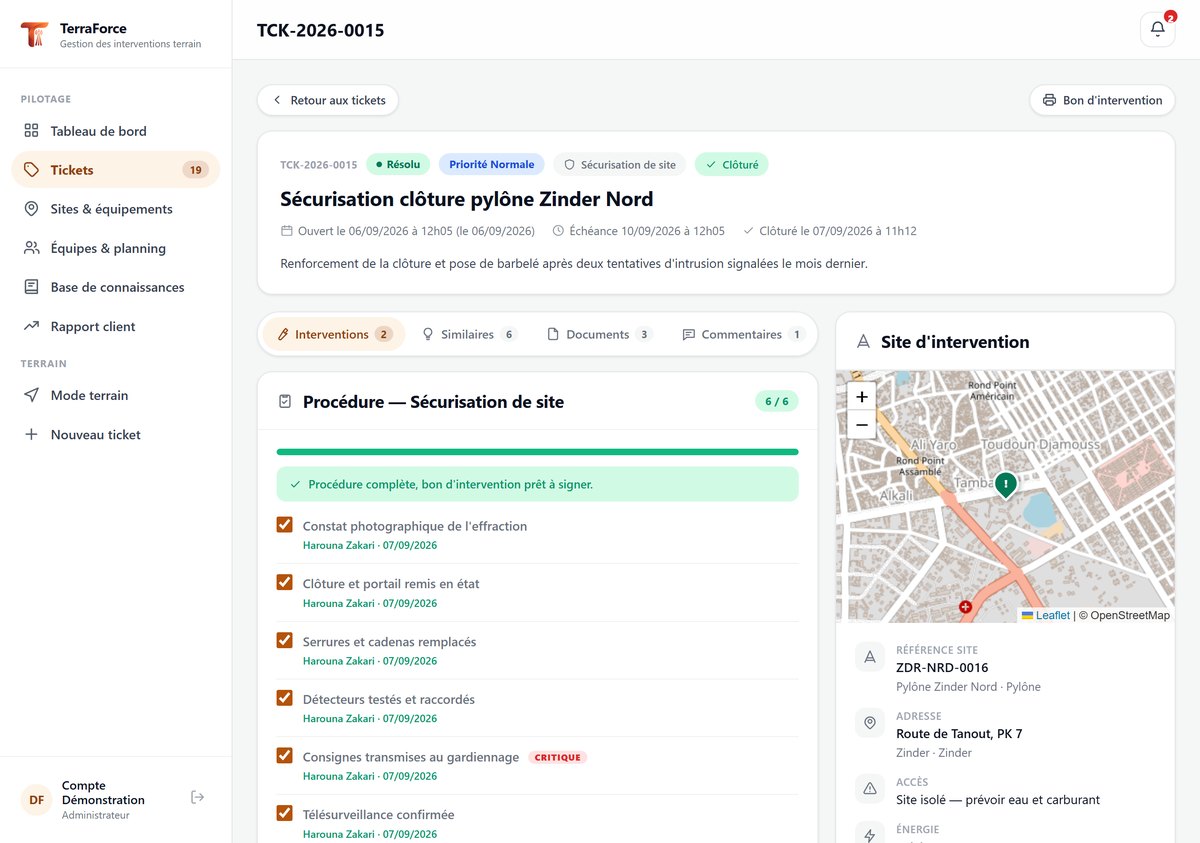
One record, not seven tabs to open in seven modules. The site is mapped with its access instructions; successive visits, documents, comments and history sit under the same header.
- Interventions : every visit to the site, with its duration, parts and procedure
- Similar cases : work already done on the same type of job and equipment
- Documents : photographs, readings, signed orders, customer attachments
- Comments : internal discussion, with people mentioned by name
- History : who changed what, when, and what the value was before
See the platform run on your own cases
An hour is enough: you open a request, assign it, close it and print the signed work order. Then we look at how your operation fits in: your customers, your sites, your contractual deadlines.